Attribution Tracker
Free, or Pro from $4 a month
Records where every visitor came from and attaches it to the form they submit, so a lead in your inbox arrives with its campaign on it.
Free version coming to WordPress.org. Pro adds what is listed below, billed once a year at $48 for one site.
Installing Attribution Tracker, every setting it has, the screens it adds, and its 14 documented actions and filters. The full reference, including the arguments every hook receives, ships inside the plugin on its Documentation screen and in docs/HOOKS.md, so it can never describe a version you are not running.
On this page
What you need
- WordPress 6.4 or newer
- PHP 8.0 or newer
- No other plugin, service or account required
Installing it
- The free version is in review for the WordPress.org directory. Once listed, open Plugins → Add New, search for Attribution Tracker, install and activate it.
- Open its Status screen from the sidebar. It reports what is running, and it is the first place to look if something later seems not to be.
- That is the whole installation. Every setting has a working default, so nothing has to be configured before the plugin does its job.
Adding Pro
- Keep the free plugin active. Pro extends it rather than replacing it, and WordPress refuses to activate Pro on its own.
- Download the Pro zip from your receipt or your order history, then install it through Plugins → Add New → Upload Plugin.
- Paste your licence key on the Licence screen and activate it. Updates then arrive in wp-admin like any other plugin.
Where everything is in wp-admin
- Status reports what is running, what this browser has stored, and every token a form field can use.
- Settings holds the cookie name, retention, custom parameters and the debug panel.
- Documentation is the full reference, bundled with the plugin rather than linked to a website.
- Reports is added by Pro: revenue and orders by source, medium, campaign or channel, with CSV export.
Settings
Every one of these has a default that works. The defaults below are the ones in the code, not a recommendation.
| Setting | Default | What it does |
|---|---|---|
cookie_name | wpat_attribution | Name of the first party cookie the attribution record is kept in. Change it if another tool has already taken the name. |
retention_days | 90 | How long a stored record is honoured for. The free tier allows up to 90 days, Pro up to 730. |
custom_params | none | Extra query parameters to capture alongside the UTMs and click IDs. One in the free tier, up to 100 in Pro. |
server_backup | on | Fills the tracking fields on the server when a form is submitted, so a submission cannot arrive empty if the browser script never ran. |
public_debug | off | Shows the front end debug panel to logged out visitors as well as to administrators. Useful while setting up, and best turned off after. |
Actions and filters
Limits, classifications, tracked values and admin screens are all filterable, so extending this plugin does not mean forking it. Names and descriptions below are generated from the source.
| Action | What it is for |
|---|---|
wpat_fields_changed | Fires after managed attribution fields are added to or removed from forms. |
wpat_loaded | Fires once every feature has registered its hooks. |
wpat_register_features | Fires before any feature registers its hooks. |
wpat_settings_saved | Fires after the plugin's settings have been stored. |
| Filter | What it is for |
|---|---|
wpat_admin_screens | Filters this plugin's admin screens. |
wpat_channel_rules | Filters the channel classification rule set. |
wpat_custom_param_limit | Filters how many custom parameters this site may track. |
wpat_debug_allowed | Filters whether the current visitor may open the debug panel. |
wpat_debug_config | Filters the debug panel configuration handed to the capture script. |
wpat_feature_enabled | Filters whether a feature is switched on. |
wpat_migrations | Filters the migration steps. |
wpat_retention_max | Filters the longest retention window this site may configure. |
wpat_script_config | Filters the configuration passed to the capture script. |
wpat_tracked_params | Filters the query parameters captured on every page view. |
Added by Pro
| Filter | What it is for |
|---|---|
wpat_report_order_statuses | Filters the order statuses counted as a conversion in the attribution reports. |
wpat_reports_actions | Filters the buttons shown beside the Reports heading. |
wpatp_licence_server | Filters the licence server this site talks to. |
A worked example
// Capture a parameter your ad platform sends that nobody else uses.
add_filter( 'wpat_tracked_params', function ( array $params ): array {
	$params[] = 'partner_ref';

	return $params;
} );

// Classify a source of your own, so reports group it with the rest of paid.
add_filter( 'wpat_channel_rules', function ( array $rules ): array {
	$rules['Paid Social'][] = 'partner-network';

	return $rules;
} );

// Do something of your own whenever a form's tracking fields change.
add_action( 'wpat_fields_changed', function ( string $operation, array $form_ids ): void {
	error_log( "attribution fields $operation on " . count( $form_ids ) . ' form(s)' );
}, 10, 2 );
If something is wrong
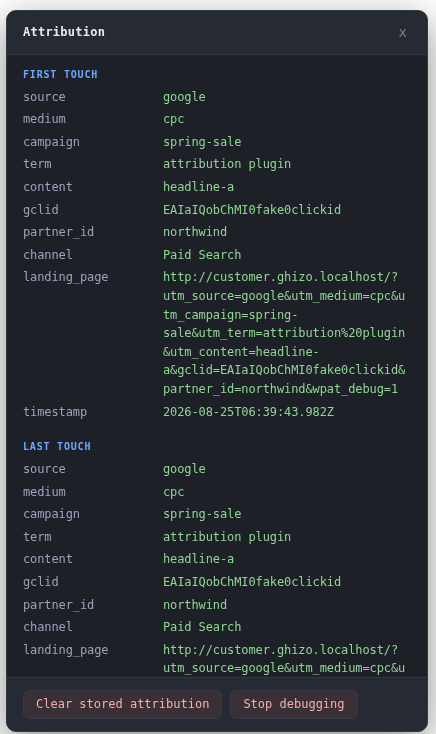
Check the Status screen, then the debug panel on the front end: between them they name what was captured, what matched and why. If that does not answer it, write to us and say what you expected instead. There is also the product page if you want to see the screens before installing anything.
The other two plugins
Dynamic Content
Shows a different phone number, WhatsApp number or call to action depending on how the visitor arrived, so you can tell which campaign generated the call.
Responsive Focal Point
Lets an editor pick the part of an image that must never be cropped out, and set a different point per breakpoint when one is not enough.