Dynamic Content
Free, or Pro from $4 a month
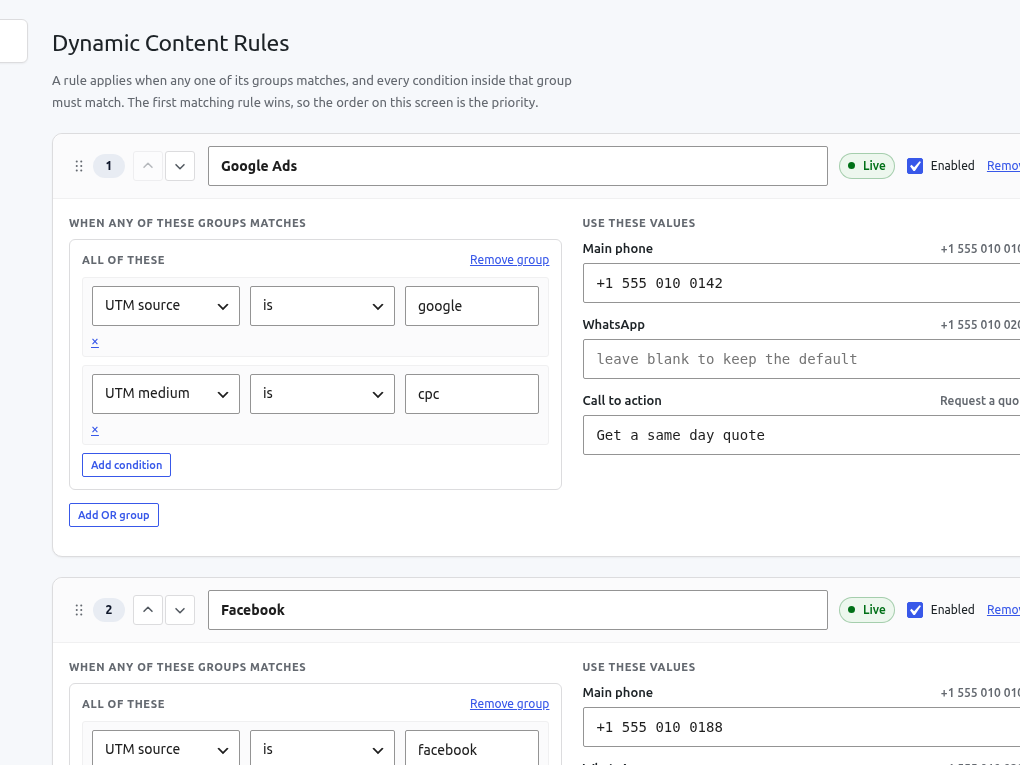
Shows a different phone number, WhatsApp number or call to action depending on how the visitor arrived, so you can tell which campaign generated the call.
Free version coming to WordPress.org. Pro adds what is listed below, billed once a year at $48 for one site.
Installing Dynamic Content, every setting it has, the screens it adds, and its 18 documented actions and filters. The full reference, including the arguments every hook receives, ships inside the plugin on its Documentation screen and in docs/HOOKS.md, so it can never describe a version you are not running.
On this page
What you need
- WordPress 6.4 or newer
- PHP 8.0 or newer
- No other plugin, service or account required
Installing it
- The free version is in review for the WordPress.org directory. Once listed, open Plugins → Add New, search for Dynamic Content, install and activate it.
- Open its Status screen from the sidebar. It reports what is running, and it is the first place to look if something later seems not to be.
- That is the whole installation. Every setting has a working default, so nothing has to be configured before the plugin does its job.
Adding Pro
- Keep the free plugin active. Pro extends it rather than replacing it, and WordPress refuses to activate Pro on its own.
- Download the Pro zip from your receipt or your order history, then install it through Plugins → Add New → Upload Plugin.
- Paste your licence key on the Licence screen and activate it. Updates then arrive in wp-admin like any other plugin.
Where everything is in wp-admin
- Slots is every value on the site a rule is allowed to change, each with the default a visitor sees otherwise.
- Rules is the ordered list of conditions, first match wins.
- Status reports what is live and shows the markup and shortcode for placing a slot.
- Settings holds the cookie name, retention, DOM watching and the debug panel.
- Documentation is the full reference, bundled with the plugin.
Settings
Every one of these has a default that works. The defaults below are the ones in the code, not a recommendation.
| Setting | Default | What it does |
|---|---|---|
cookie_name | wpdc_context | Name of the first party cookie the visitor context is kept in. |
retention_days | 30 | How long the context that decides which rule matches is remembered. Anywhere from 0 to 365. |
watch_dom | on | Keeps watching for content added after the page loaded, so a slot inside a popup or a lazily rendered block is still replaced. |
public_debug | off | Shows the front end debug panel to logged out visitors as well as to administrators. |
Actions and filters
Limits, classifications, tracked values and admin screens are all filterable, so extending this plugin does not mean forking it. Names and descriptions below are generated from the source.
| Action | What it is for |
|---|---|
wpdc_import_completed | Fires after an export file has been imported. |
wpdc_loaded | Fires once every feature has registered its hooks. |
wpdc_register_features | Fires before any feature registers its hooks. |
wpdc_rules_saved | Fires after the set of rules has been stored. |
wpdc_settings_saved | Fires after the plugin's settings have been stored. |
wpdc_slots_saved | Fires after the set of slots has been stored. |
| Filter | What it is for |
|---|---|
wpdc_admin_screens | Filters this plugin's admin screens. |
wpdc_countries | Filters the countries offered as suggestions on the rules screen. |
wpdc_debug_allowed | Filters whether the current visitor may open the debug panel. |
wpdc_debug_config | Filters the debug panel configuration handed to the front end script. |
wpdc_device_breakpoints | Filters the viewport widths that separate mobile, tablet and desktop. |
wpdc_feature_enabled | Filters whether a feature is switched on. |
wpdc_geo_available | Filters whether a visitor's country and region can be resolved here. |
wpdc_geo_config | Filters the geo configuration handed to the front end script. |
wpdc_migrations | Filters the migration steps. |
wpdc_rule_limit | Filters how many rules this site may configure. |
wpdc_script_config | Filters the configuration passed to the front end script. |
wpdc_slot_limit | Filters how many slots this site may configure. |
A worked example
// Raise the free tier's limits, or lower them for an editor you do not trust.
add_filter( 'wpdc_slot_limit', fn( int $limit ): int => 20 );
add_filter( 'wpdc_rule_limit', fn( int $limit ): int => 40 );

// Decide the visitor's country yourself, from a header your CDN sets.
add_filter( 'wpdc_visitor_country', function ( string $country ): string {
	return $_SERVER['HTTP_X_GEO_COUNTRY'] ?? $country;
} );

// React to a configuration import, for example to clear your own cache.
add_action( 'wpdc_import_completed', function ( array $slots, array $rules ): void {
	wp_cache_flush();
}, 10, 2 );
If something is wrong
Check the Status screen, then the debug panel on the front end: between them they name what was captured, what matched and why. If that does not answer it, write to us and say what you expected instead. There is also the product page if you want to see the screens before installing anything.
The other two plugins
Attribution Tracker
Records where every visitor came from and attaches it to the form they submit, so a lead in your inbox arrives with its campaign on it.
Responsive Focal Point
Lets an editor pick the part of an image that must never be cropped out, and set a different point per breakpoint when one is not enough.